

Windows용 1 입력 2 출력 SRT 이중화 프록시
Languages: English 中文 한국어 Español
SRT Redundancy Proxy는 Windows에서 하나의 SRT 스트림을 수신하고 최대 두 개의 SRT 대상으로 전달하는 앱입니다. 동일한 MPEG-TS 스트림을 여러 수신기로 중계해야 하는 이중화 전송, 모니터링, 검증 워크플로에 적합합니다.
graph LR
    Sender["SRT Sender<br/>(Caller)"]
    App["SRT Redundancy Proxy<br/>(Input Listener)"]
    Network["Network<br/>(LAN / Internet)"]
    Receiver1["Output1 Receiver<br/>(SRT Listener)"]
    Receiver2["Output2 Receiver<br/>(SRT Listener)"]

    Sender -->|SRT + MPEG-TS| App
    App -->|SRT + MPEG-TS| Network
    Network --> Receiver1
    Network --> Receiver2

    style Sender fill:#D7F4D2,stroke:#3C8D40,color:#000
    style App fill:#A8D5FF,stroke:#4A90E2,color:#000
    style Receiver1 fill:#90CAF9,stroke:#1976D2,color:#000
    style Receiver2 fill:#90CAF9,stroke:#1976D2,color:#000
    style Network fill:#FFFFFF,stroke:#CCCCCC,color:#000
수신 장비에서 하나 또는 두 개의 SRT listener를 시작합니다. 간단한 테스트에는 FFplay를 사용할 수 있습니다.
ffplay "srt://0.0.0.0:9100?mode=listener"
ffplay "srt://0.0.0.0:9200?mode=listener"
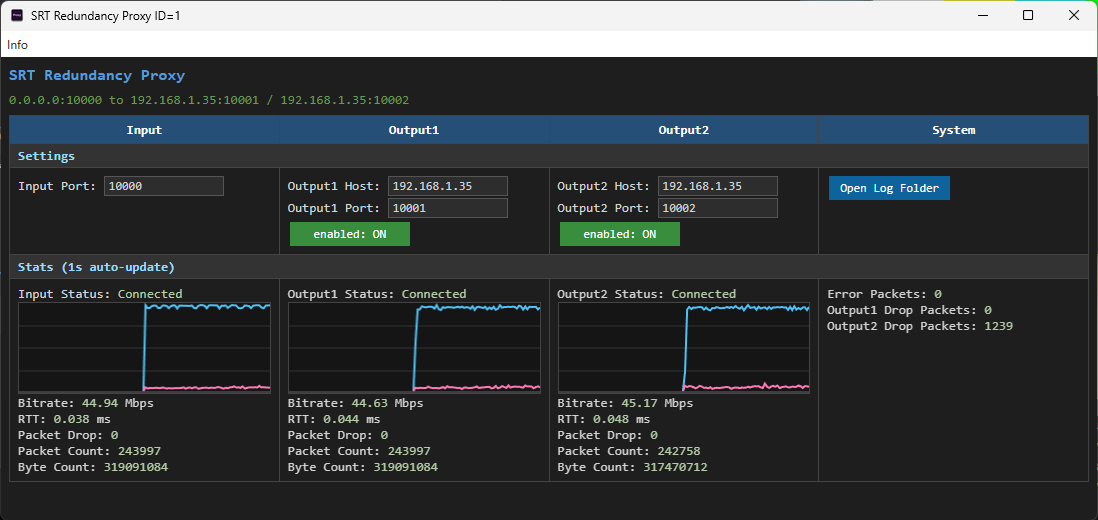
SRT Redundancy Proxy를 실행하고 입력 포트와 출력 대상을 설정합니다.
기본값은 입력 포트 9000에서 수신하고 127.0.0.1:9100 및 127.0.0.1:9200으로 전달합니다.
인코더, FFmpeg 또는 다른 SRT 송신기에서 프록시 입력 포트로 SRT 스트림을 보냅니다.
ffmpeg -re -i input.ts -c copy -f mpegts "srt://127.0.0.1:9000?mode=caller"
앱은 연결 상태와 통계를 1초마다 업데이트합니다. Output1 및 Output2 토글로 각 전달 경로를 제어할 수 있습니다.